
Insurance document managementPolicy forms, claims and disclosures, handled end to end.
Take claims in online, collect supporting documents from policyholders, and keep every policy and disclosure ready for the auditor. All of it happens on one suite that plugs into the systems you already run.
A single claim can touch a dozen documents and half a dozen people. When those documents live in email threads, shared drives and three different portals, the slow part of a claim isn’t the decision. It’s finding the paperwork.
VectorViewer keeps the whole file in one place, from the first notice of loss to the signed settlement. Adjusters see the same version the policyholder submitted. Compliance sees who touched what, and when.
Where insurance teams use it most.
VectorForms
Fillable policy & claims forms
Turn the paper claim form you already use into a prefilled online one. Business rules catch missing fields before the claim reaches an adjuster, and routing sends it to the right reviewer when several parties have to sign off.
Learn more →
VectorViewer
Review & annotate claim files
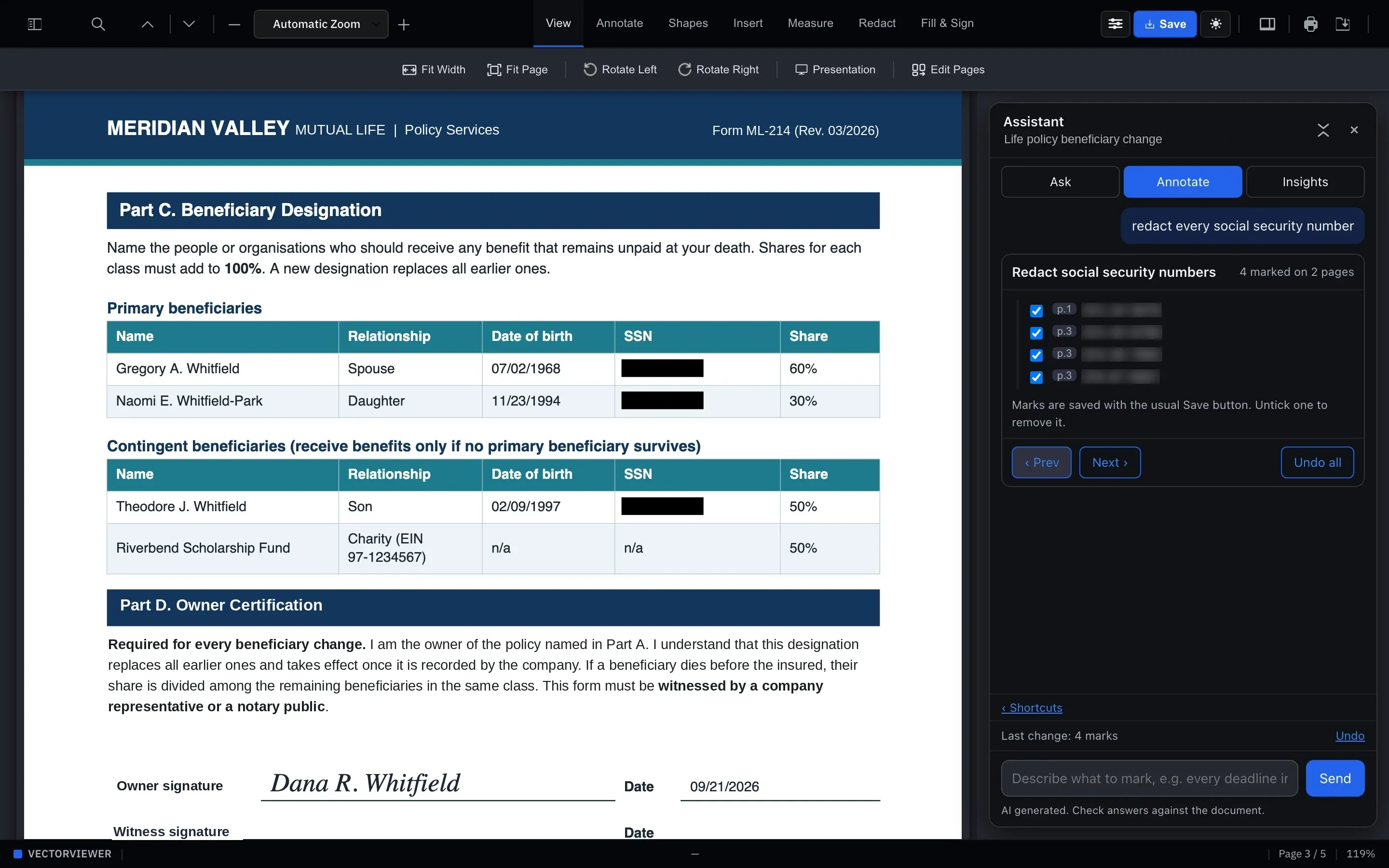
Photos, estimates, police reports and medical bills open in the browser, whatever the format. Adjusters add notes and stamps, and redact claimant PII before anything goes to a third party.
Learn more →
VectorSign
E-signature on every policy
Collect signatures from the insured, the agent and the carrier from a single link. Settlements that used to wait on the mail close in a fraction of the time.
Learn more →
One claim, start to finish.
Here’s what a typical property claim looks like once it runs through the suite.
01
The policyholder files a claim
A prefilled intake form collects the details and photos. Business rules validate it on the spot, so nobody has to call back about a missing date of loss.
02
The adjuster reviews the file
Everything opens in VectorViewer. The adjuster marks it up, leaves threaded comments for the team, and redacts sensitive claimant data before sharing with a contractor.
03
The settlement is signed
The settlement goes to every party for signature. The signed copy and its audit trail are filed with the policy record, with the full version history kept.
The documents we see every day.
If it’s a PDF, an image or an Office file, it opens in the browser. If it’s a paper form, we can make it fillable.
- First notice of loss forms
- Proof of loss statements
- Policy applications
- Declarations pages
- Endorsements and riders
- Required disclosures
- Repair estimates and invoices
- Settlement agreements
- Medical records and bills
- Agent and broker agreements
For claims
Fewer callbacks for missing information, and one file per claim instead of a folder of attachments.
For underwriting
Applications arrive complete and validated. Supporting documents open next to them without downloads.
For policy service
Endorsements and changes go out for signature from a link, with no account for the insured to create.
For compliance
Every signed disclosure has an audit trail, and every document keeps its version history.
Fits alongside your policy and claims systems.
There’s no rip-and-replace. Every product in the suite has a standard API, so VectorViewer sits next to the policy administration and claims systems you already run. Claim forms are prefilled from the policy record, completed submissions flow back into the claim file, and signed settlements are archived where adjusters already look.
If policyholder data has to stay in your environment, the whole suite runs inside your own AWS account, under your brand.
Connects through standard APIs to
- Policy administration
- Claims management
- Agent and broker portals
- Document archives
Questions from insurers.
Can the suite handle claims intake end to end?
Yes. A claim can go from intake form through review, signature and archival without leaving the suite.
Are policy disclosures kept audit-ready?
Every signed policy and disclosure carries a full audit trail, and every document that’s touched keeps its version history.
How does redaction work?
Mark areas with rectangle or circle redactions. The redactions are applied when the document is exported, so the copy you share carries the redacted output.
Will it work with our claims or policy admin system?
Every product has a standard API, so it fits alongside the systems you already run. There’s no rip-and-replace.
Can policyholder data stay in our own environment?
Yes. With private cloud, the full suite runs inside your own AWS account.
Send us one of your claim forms.
We’ll turn it into a working online form and walk you through the rest of the claim on the call.